
Qwen-Image InstantX Inpainting ControlNet
Professional inpainting and image editing with Qwen-Image InstantX ControlNet. Supports object replacement, text modification, background changes, and outpainting.
About
About how to create mask Right-click on the Load Image node, then click "Open in MaskEditor" to open it and paint the area you want to inpaint.
You can learn more about MaskEditor in the MaskEditor Document
About ImageCompositeMasked Some users might want to keep the unmasked area unchanged, though with ImageCompositeMasked, we can paste the original pixels back.
About ImageScaleToMaxDimension The input image shouldn't be too large (such as more than 3000). A too large input might cause bad results. You can enable the *ImageScaleToMaxDimension* node to download and scale the input image.
**Model links** Tutorial
Parameters
| Parameter | Type | Default | Description |
|---|---|---|---|
seed | int | 375729975350303 | Random seed (use -1 for random) |
steps | int | 4 | Number of sampling steps |
cfg | float | 1 | CFG scale (guidance strength) |
sampler_name | enum | euler | Sampler algorithm |
scheduler | enum | simple | Noise scheduler |
filename_prefix | string | ComfyUI | Output filename prefix |
Usage
c3 comfyui run image_qwen_image_instantx_inpainting_controlnet \
  --prompt "your prompt here" \
  --output my_output \
  --steps 4 \
  --cfg 1
Required Models
Example Prompt
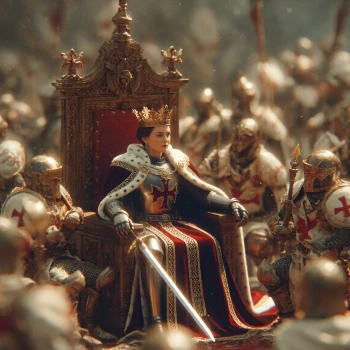
"``` The Queen, on a throne, surrounded by Knights, HD, Realistic, Octane Render, Unreal engine ```"
Ready to run this template?
Install the CLI and run this template on GPU in seconds.
pip install hypercli-cli && hyper comfyui run image_qwen_image_instantx_inpainting_controlnet